RPA vs Workflow Automation: What to Use When
RPA vs workflow automation: when to model the process in a flow engine, when UI bots are a temporary bridge, and how to combine both without fragile operations.
Robotic process automation mimics human clicks in legacy interfaces. Workflow automation models the process itself—states, approvals, escalations, timers, and system events. Confusing the two leads to fragile bots doing work that should live in a proper flow engine, or over-engineered orchestration for a problem a short-lived UI bridge could solve.
Mature operations teams often use both—but intentionally, with clear ownership and retirement criteria for RPA. The failure mode is letting bots become the undocumented source of truth because they were faster to demo on day one.
Use workflow automation when
If you control—or can influence—the systems involved, model the process where auditability and change management matter. Workflow platforms excel when rules evolve, exceptions must reach named roles, and you need a durable history of who did what and when.
- You control the application or have stable APIs to systems of record
- The process needs audit trails, SLAs, and clear ownership
- Business rules will change and must stay maintainable by operations
- Exceptions must surface to named roles instead of failing silently
Use RPA when
RPA earns its keep when the UI is the only integration surface, volume is high enough to justify maintenance, and the steps are stable enough that selector breakage is predictable rather than constant.
- A critical system has no usable API and no near-term vendor roadmap
- You need a temporary bridge during migration or package replacement
- Volume is high and UI steps change infrequently
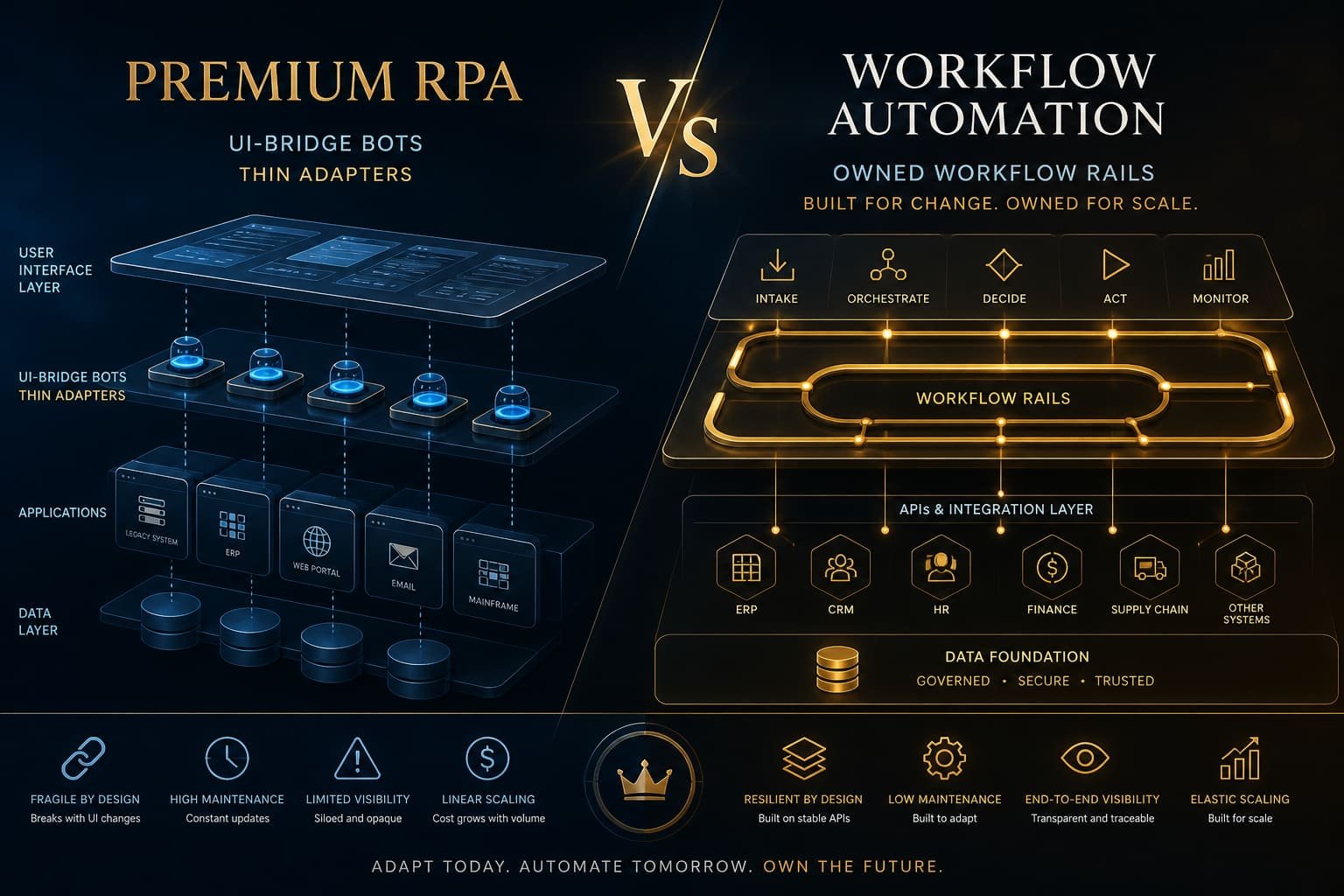
A combined pattern that works
Own the process in a workflow platform: intake, approvals, exception queues, and integration with your CRM or ERP where APIs exist. Call RPA only for the last-mile legacy step—posting into a screen, downloading a report, or copying a field the API never exposed.
Document the bot as temporary infrastructure. Set a trigger to retire it when the API ships, the module is replaced, or volume drops below maintenance cost. Bots without exit plans become permanent liability on someone’s on-call rotation.
RPA is a bridge. Workflow automation is the road. Do not build your operating model on the bridge.
Decision criteria in one page
If the process needs durable states, approvals, and audit history, start with workflow automation. If a legacy screen is the only integration surface and volume is high, RPA can help—temporarily. The moment an API exists, prioritize migration off the bot.
- Workflow first when you own the process model and data semantics
- RPA only when UI is the sole viable interface—and budget maintenance
- Never let bots become the undocumented system of record
- Plan for selector drift, credential rotation, and environment changes
Teams get into trouble when RPA becomes the default because it looks fast in a proof of concept. Speed without ownership creates operations that break whenever a vendor changes a layout, a field label, or a login flow.
LucidNova's stance
We prefer durable workflow design first and introduce RPA only where it earns its keep—with an exit plan, named owner, and monitoring that treats bot failures as production incidents, not “the robot will fix itself.”
Contact LucidNova Technologies · hello@lucidnovatech.com · Mumbai, Maharashtra, India