LLM Integration Patterns That Work in Business Apps
LLM integration patterns for business apps: permission-aware retrieval, structured extraction, draft-then-review, narrow tool permissions, evaluation ownership, and staged rollout.
Dropping a chat widget onto an enterprise product is easy. Making LLM features trustworthy is not. In production, users care less about clever replies and more about whether the answer is allowed, grounded, and safe to act on.
The patterns that survive share one trait: the model is constrained by business context, permissions, and explicit human checkpoints. Intelligence is useful only when it reduces work without creating new operational risk.
Pattern 1: Retrieval with permission awareness
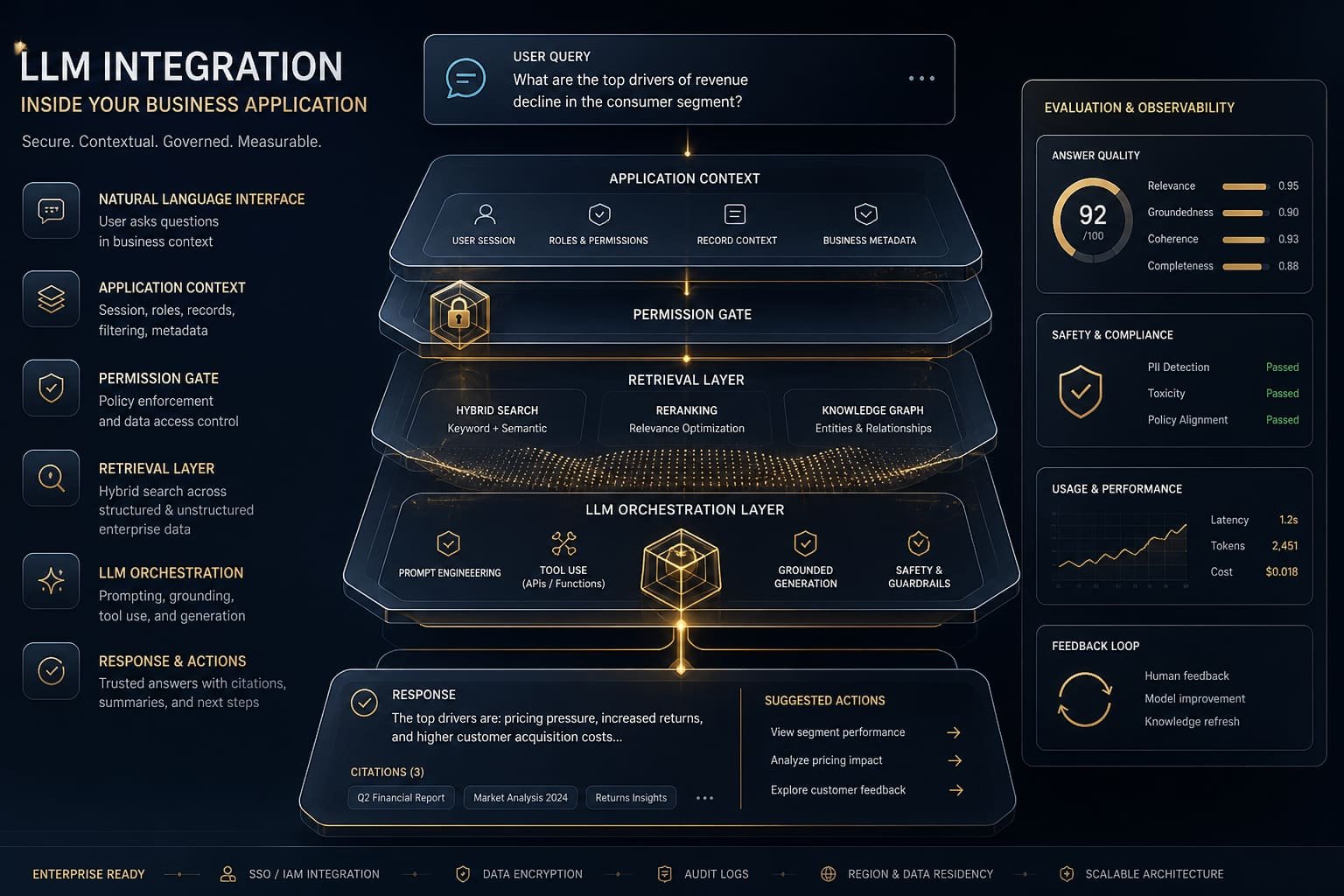
Answers should come from approved sources the user is allowed to see. Retrieval-augmented generation without access control creates confident leaks. Index documents with the same permission model your application already uses, and refuse to answer when the corpus does not support the claim.
Permission-aware retrieval also improves trust. When users can see which sources informed an answer, they can challenge weak results instead of treating the model as an authority. Log which documents were retrieved for sensitive queries.
Pattern 2: Structured extraction into systems of record
Use models to draft structured fields—then write to ERP, CRM, or operations systems only after validation. Free-form prose can help people move faster, but durable value comes from clean data entering systems of record with clear ownership.
- Extract fields the business already understands
- Validate required values before any write
- Keep a human confirm step for irreversible updates
- Store the source document and extraction confidence for audit
Pattern 3: Draft-then-review
For customer replies, internal briefs, and policy-sensitive text, the model drafts and a human sends. This single gate removes most brand and compliance risk while still saving time. It also creates training signal: reviewers can mark what was edited and why.
Draft-then-review works best when the UI makes review faster than writing from scratch—highlight diffs, suggest citations, and pre-fill structured fields the human can accept or reject in one screen.
Pattern 4: Tool use with narrow permissions
When a model can call tools, give it the smallest set of actions needed for one workflow. Broad tool access turns a helpful assistant into an unpredictable operator. Log every tool call, constrain side effects, and escalate when confidence drops.
Treat tool permissions like API keys: scoped, rotatable, and reviewed when workflows change. Never expose destructive actions without the same approval path you would require for a human operator.
Evaluation is not optional
Ship with a golden set of real examples from your domain and measure behavior continuously—not only before launch. Model, prompt, and corpus changes can regress quality silently.
- Keep a golden set of real examples from your domain
- Track refusal, escalation, and correction rates
- Log prompts, sources, and outcomes for audit
- Assign an owner when quality drifts after launch
- Re-test after prompt, model, or corpus changes
Rollout sequence that preserves trust
Start shadow mode: suggestions only, no writes. Move to human-approved actions for a defined period. Expand autonomy only for low-risk steps with clear rollback. Skipping this sequence is how chat features become shelfware.
If nobody owns model quality after launch, the feature will quietly decay until teams stop trusting it.
Where LucidNova starts
We begin with one workflow, one corpus, and one review policy. Expand only after the integration reduces measurable effort without creating new operational risk. That sequence keeps GenAI useful inside the product—not as a side experiment that never earns trust.
Contact LucidNova Technologies · hello@lucidnovatech.com · Mumbai, Maharashtra, India